Security Features of HiveMQ
HiveMQ is designed from the ground up with maximum security in mind. For mission-critical IoT and M2M scenarios, secure end-to-end encrypted communication and advanced authentication and authorization features are essential. HiveMQ gives you the flexibility to enable the specific security features that your deployment requires.
| If you are unfamiliar with MQTT security concepts, see the MQTT Security Fundamentals blog series. |
Authentication & Authorization in HiveMQ
HiveMQ handles authentication and authorization through security extensions.
For example, the HiveMQ Enterprise Security Extension ships as part of the HiveMQ Enterprise MQTT Broker release bundle.
For configuration details, see the HiveMQ Security Extension documentation.
You can also download the HiveMQ File RBAC community extension from the HiveMQ website or use the open HiveMQ Extension SDK to develop your own security extension.
HiveMQ includes a hivemq-allow-all-extension for testing purposes.
This extension authorizes all MQTT clients to connect.
Before you use HiveMQ in production, you must add an appropriate security extension and remove the hivemq-allow-all-extension.
|
TLS
Transport Layer Security (TLS) is a cryptographic protocol that allows secure and encrypted communication at the transport layer between a client application and a server. If you enable a TLS listener in HiveMQ, each client connection for that listener is encrypted and secured by TLS.
|
Multiple listeners
You can configure HiveMQ with multiple listeners so HiveMQ can handle secure and insecure connections simultaneously.
For more information, see HiveMQ MQTT Listeners.
|
For deployments where MQTT messages contain sensitive information, we strongly recommend that you enable TLS. When configured correctly, TLS makes it extremely difficult for attackers to break the encryption and read packets on the wire. TLS encrypts the complete transport layer, which makes TLS a better choice than custom payload encryption when security is the priority.
TLS Overhead Considerations
TLS adds CPU and communication overhead. The TLS handshake adds bandwidth and computation overhead when a connection is established. The additional CPU usage is typically negligible on the broker, but can affect constrained devices that are not designed for computation-intensive tasks. If your deployment uses unreliable connections that frequently drop, consider the increased overhead. For more information, see TLS/SSL - MQTT Security Fundamentals.
Java Key Stores and Trust Stores
For information on how to create a key store, see HiveMQ Broker How-Tos.
|
PEM certificate files
HiveMQ can load TLS certificates, private keys, and CA certificates directly from PEM-encoded files (.pem, .crt, .key).
PEM certificate files are an alternative to keystores and truststores and require no keytool conversion.
PEM certificate files are not available in the HiveMQ Community Edition.
For more information, see PEM Certificate Files.
|
|
Autoreload
HiveMQ reloads key stores, trust stores, and PEM certificate files during runtime for MQTT listeners, the HiveMQ Control Center, and the HiveMQ REST API.
You can add or remove client certificates in the truststore without downtime. You can also change the server certificate in the keystore without downtime.
If the same master password is used, you can replace the key store and trust store files without downtime.
The cluster transport is the exception: it reads its TLS configuration only at startup, so certificate rotation on the cluster transport requires a node restart.
|
Communication Protocol
When no explicit SSL/TLS version is set, HiveMQ automatically uses one of the two default-enabled protocols based on client support. TLSv1.2 or TLSv1.3 are recommended because these protocols tend to be more secure.
When no explicit TLS version is set, HiveMQ uses TLSv1.2 or TLSv1.3 by default, based on the version the client supports.
The default tls-tcp-listener configuration of HiveMQ enables the following TLS protocols by default:
TLSv1.3
TLSv1.2
| For security reasons, the Java runtime that HiveMQ requires disables TLSv1 and TLSv1.1 by default. HiveMQ therefore requires TLS 1.2 or later. |
To support TLSv1 or TLSv1.1, you must do both of the following:
-
Remove the protocol from the
jdk.tls.disabledAlgorithmsproperty in thejava.securityfile of the Java runtime that runs HiveMQ (for example,$JAVA_HOME/conf/security/java.security) and restart HiveMQ. -
Add the protocol to the TLS version configuration of your HiveMQ listener (see example explicit HiveMQ TLS configuration).
We strongly discourage the use of TLSv1 and TLSv1.1.
To enable only specific protocols, you can use an explicit TLS configuration that is similar to the following example. If necessary, you can also use such an explicit configuration to enable legacy protocols such as TLSv1 and TLSv1.1:
<?xml version="1.0"?>
<hivemq xmlns:xsi="http://www.w3.org/2001/XMLSchema-instance">

    ...
    <listeners>
        ...
        <tls-tcp-listener>
            <tls>
                ...
                <!-- Enable specific TLS versions manually -->
                <protocols>
                    <protocol>TLSv1.2</protocol>
                </protocols>
                ...
            </tls>
        </tls-tcp-listener>
    </listeners>
    ...
</hivemq>
Cipher Suites
The security of TLS depends on the cipher suites in use. Usually, JVM vendors enable only secure cipher suites by default. If you need to restrict HiveMQ to specific cipher suites, you can configure them explicitly.
HiveMQ enables the following cipher suites by default:
TLS_ECDHE_ECDSA_WITH_AES_256_GCM_SHA384
TLS_ECDHE_ECDSA_WITH_AES_128_GCM_SHA256
TLS_ECDHE_RSA_WITH_AES_128_GCM_SHA256
TLS_ECDHE_RSA_WITH_AES_128_CBC_SHA
TLS_ECDHE_RSA_WITH_AES_256_CBC_SHA
| AES256 requires JCE unlimited strength jurisdiction policy files. |
|
TLS_RSA cipher suites are disabled by default in Java 21.0.10 and later versions due to lack of forward secrecy. Use ECDHE cipher suites for secure connections. |
If none of the default cipher suites are supported, the cipher suites that your JVM enables are used.
| The list of cipher suites that are enabled by default can change with any HiveMQ release. If you depend on specific cipher suites, specify the cipher suites explicitly. |
<?xml version="1.0"?>
<hivemq xmlns:xsi="http://www.w3.org/2001/XMLSchema-instance">

    ...
    <tls>
        ...
        <!-- Only allow specific cipher suites -->
        <cipher-suites>
            <cipher-suite>TLS_RSA_WITH_AES_128_CBC_SHA</cipher-suite>
            <cipher-suite>TLS_RSA_WITH_AES_256_CBC_SHA256</cipher-suite>
            <cipher-suite>SSL_RSA_WITH_3DES_EDE_CBC_SHA</cipher-suite>
        </cipher-suites>
        ...
    </tls>
    ...
</hivemq>
Each TLS listener can be configured to have its own list of enabled cipher suites.
Native SSL
HiveMQ comes prepackaged with an OpenSSL implementation called BoringSSL that is maintained by Google and can be activated on Linux or macOS.
The main advantage of native SSL is increased performance compared to standard JVM SSL. Native SSL also provides access to additional cipher suites, including:
-
Stronger AES with GCM
-
The ChaCha20 stream cipher
-
Additional cipher suites with elliptic curve algorithms
Limitations:
-
Native SSL is not available on all platforms. If native SSL is not supported on your platform, HiveMQ performs a graceful fallback to the SSL implementation of your JVM.
-
Cluster transport TLS connections cannot use the native SSL implementation.
-
If native SSL is enabled, you cannot disable the SSLv2Hello communication protocol.
-
If you configure cipher suites that are available in OpenSSL but not in JVM SSL, the broker may have no matching cipher suites for any client, and connections cannot be established.
To enable HiveMQ Native SSL, use a configuration similar to the following:
<?xml version="1.0"?>
<hivemq xmlns:xsi="http://www.w3.org/2001/XMLSchema-instance">

    ...
    <listeners>
        ...
        <tls-tcp-listener>
            <tls>
                ...
                <native-ssl>true</native-ssl>
                ...
            </tls>
        </tls-tcp-listener>
    </listeners>
    ...
</hivemq>
Due to security concerns and to align with the OpenJDK Java Platform, from HiveMQ 4.7 onwards, HiveMQ only enables the following TLS protocols by default for native SSL:
-
TLSv1.3
-
TLSv1.2
If you need to support legacy TLS versions such as TLSv1 or TLSv1.1 for your Native SSL implementation, explicitly enable the versions in your tls-tcp-listener configuration:
<?xml version="1.0"?>
<hivemq xmlns:xsi="http://www.w3.org/2001/XMLSchema-instance">

    ...
    <listeners>
        ...
        <tls-tcp-listener>
            <tls>
                ...
                <!-- Enable legacy TLS versions manually -->
                <protocols>
                    <protocol>TLSv1.1</protocol>
                </protocols>
                <native-ssl>true</native-ssl>
                ...
            </tls>
        </tls-tcp-listener>
    </listeners>
    ...
</hivemq>
Randomness
If it is available, HiveMQ uses /dev/urandom as the default source of cryptographically secure randomness.
/dev/urandom is considered secure enough for almost all purposes [1] and has a significantly better performance than /dev/random.
If desired, you can revert to /dev/random for your random number generation:
-
Delete the line that starts with the following information from your
$HIVEMQ_HOME/bin/run.shfile if you start HiveMQ manually or the-Djava.security.egd=file:/dev/./urandomoption from the configuration file of the init service of your choice.JAVA_OPTS="$JAVA_OPTS -Djava.security.egd=file:/dev/./urandom"
OCSP stapling
The Online Certificate Status Protocol (OCSP) determines the revocation status of an SSL certificate. OCSP is frequently used as an alternative to Certificate Revocation Lists (CRL) because OCSP contains less information and requires less network traffic. The smaller data payload enables more lightweight clients.
In client-driven OCSP, each client requests certificate status directly from the OCSP responder. When many clients use client-driven OCSP, the volume of requests can cause the OCSP responder to become a performance bottleneck.
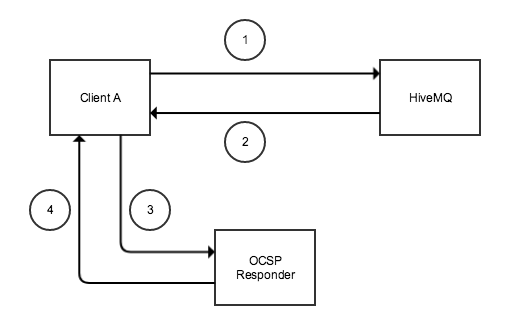
OCSP stapling allows the HiveMQ broker, rather than the client, to make the status request to the OCSP responder. The HiveMQ broker regularly obtains an OCSP response about its own certificate from the OCSP responder, caches the response, and sends it directly to the client in the initial TLS handshake. The client does not need to connect to the OCSP responder directly.
OCSP stapling significantly reduces the load on the OCSP responder because a single request per validity period replaces a request per individual client.
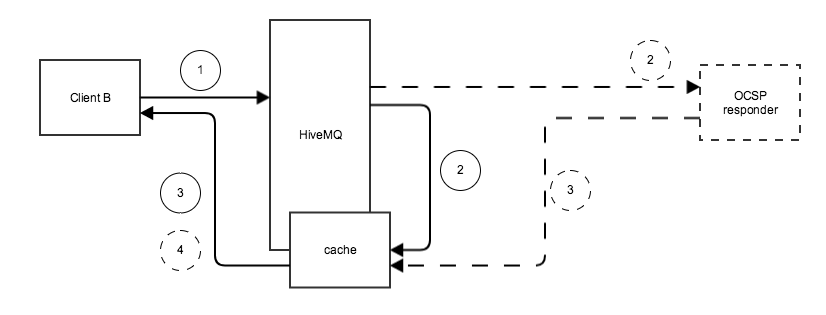
The caching interval defines how frequently the HiveMQ broker sends requests for new status information.
Between requests, the HiveMQ broker caches the last status that was received.
If the OCSP responder is not available, HiveMQ temporarily reduces the cache interval to 15 seconds to get status information as soon as possible.
Once a successful OCSP response is received, the interval automatically reverts to the configured value.
If the HiveMQ broker does not receive a valid response within 30 minutes, the cached response is cleaned up and no OCSP response is sent to the client.
However, HiveMQ continues to try to establish a connection with the OCSP responder.
HiveMQ initiates requests for status information to the OCSP responder in the following cases:
-
When a TLS listener starts
-
When the configured cache interval expires
-
When a client requires status information and the response is not yet cached
-
If the cached response expires and a new TLS connection is established
OCSP Stapling Configuration Properties
The <ocsp-stapling> element has the following properties:
| Name | Default | Mandatory | Description |
|---|---|---|---|
|
|
|
Enables OCSP stapling. |
|
|
|
Overrides the URL of the OCSP Responder contained in the server certificate. An override URL must be set if no OCSP URL information is included in the server certificate. |
|
|
|
Interval in seconds to cache the OCSP response on the server side from the OCSP stapling responder. |
OCSP stapling configuration
The following configuration enables OCSP stapling for a TLS TCP listener:
<?xml version="1.0"?>
<hivemq xmlns:xsi="http://www.w3.org/2001/XMLSchema-instance">

    <listeners>
        ...
        <tls-tcp-listener>
            <port>8883</port>
            <bind-address>0.0.0.0</bind-address>
            <tls>
                <keystore>
                    <path>/path/to/the/key/store.jks</path>
                    <password>password-keystore</password>
                    <private-key-password>password-key</private-key-password>
                </keystore>
                <native-ssl>true</native-ssl>
                <ocsp-stapling>
                    <enabled>true</enabled>
                </ocsp-stapling>
            </tls>
        </tls-tcp-listener>
        ...
    </listeners>
</hivemq>|
Preconditions
OCSP stapling is disabled by default.
To use OCSP stapling you must set <native-ssl> and <ocsp-stapling><enabled></ocsp-stapling> to true.
|
The following configuration enables OCSP stapling for a TLS TCP listener with a custom cache-interval and override-url:
<?xml version="1.0"?>
<hivemq xmlns:xsi="http://www.w3.org/2001/XMLSchema-instance">

    <listeners>
        ...
        <tls-tcp-listener>
            <port>8883</port>
            <bind-address>0.0.0.0</bind-address>
            <tls>
                <keystore>
                    <path>/path/to/the/key/store.jks</path>
                    <password>password-keystore</password>
                    <private-key-password>password-key</private-key-password>
                </keystore>
                <native-ssl>true</native-ssl>
                <ocsp-stapling>
                    <enabled>true</enabled>
                    <override-url>http://your.ocsp-responder.com:2560</override-url>
                    <cache-interval>3600</cache-interval>
                </ocsp-stapling>
            </tls>
        </tls-tcp-listener>
        ...
    </listeners>
</hivemq>
HiveMQ Audit Log
The audit log provides a unified record of all auditing-relevant events. You can use the audit log in several ways:
-
Review all actions performed on the HiveMQ cluster.
-
Satisfy legal and compliance requirements.
-
Provide data for intrusion-prevention software.
-
Track which users accessed which information and when.
Audit Log Configuration
The audit log is enabled by default. It can be disabled in the HiveMQ configuration file.
Audit Log File Location
By default, HiveMQ writes the audit log to <HiveMQ Home>/audit/audit.log.
To change the audit log folder, use one of the following options:
-
Set the
HIVEMQ_AUDIT_FOLDERenvironment variable. -
Set the
hivemq.audit.foldersystem property.
For more information, see Manually Setting HiveMQ Folders.
| The audit log contains sensitive information. Be sure to set the filesystem permissions of the audit folder accordingly. |
Audit Log File Rolling
HiveMQ rotates the audit log automatically at midnight each day.
The previous audit log file is archived with the filename audit.<yyyy-MM-dd>.log.
For example, after two days of operation, the audit folder contains the following files:
├─ audit.2026-04-22.log
├─ audit.2026-04-23.log
└─ audit.log| HiveMQ does not delete archived audit log files. If you need to remove old audit logs regularly, you must take additional action. For example, set up a scheduled cron job to alleviate data protection concerns or storage constraints. |
Audit Log Statement Format
Each audit log entry uses the following structure:
<time><time zone> | user:"<user name>" | IP:"<host address>" | node:"<node name>" | source:"<source>" | <event>
Audit Log Statement Arguments
| Log argument | Description |
|---|---|
|
The time when the event occurred. Format: |
|
The UTC offset of the time zone where the event occurred. Format: |
|
The User login that triggered the event. |
|
The IP address from which the user connected. Supports IPv4 or IPv6 format. |
|
The identifier of the HiveMQ cluster node on which the event occurred.
This name is logged at the start of HiveMQ in the |
|
The origin of the event that generated the audit log entry. The source can be |
|
The type of event and additional information for the event. For a list of all events, see Available HiveMQ Audit Log Events. |
Available HiveMQ Audit Log Events
The following events are listed in the audit log:
Control Center Events
| Event | Additional Information |
|---|---|
Login success |
|
Login failure |
|
Logout |
|
Authentication success |
|
Authentication failure |
Failure reason, if available. |
Force client disconnect |
With/without will message and client ID. |
Invalidate client session |
Client ID. |
Add subscription |
Topic filter, QoS, and client ID. |
Add shared subscription |
Topic filter, QoS, and client ID. |
Remove subscription |
Topic filter and client ID. |
Inspect TLS certificate |
Client ID. |
Inspect will payload |
Client ID. |
Inspect password |
Client ID. |
Inspect proxy protocol TLVs |
Client ID. |
Create backup |
|
Abort backup |
|
Upload/import backup |
Backup file name. |
Download backup file |
Backup file name. |
Delete backup file |
Backup file name. |
Restore backup |
Backup ID. |
Create trace recording |
Trace recording name, start time, end time, client filters, topic filters, and packet filters. |
Stop trace recording |
Trace recording name. |
Download trace recording |
Trace recording name. |
Delete trace recording |
Trace recording name. |
Create new schema |
Schema ID and version. |
Delete all schema versions |
Schema ID and version. |
Create schema version |
Schema ID and version. |
Create script |
Script ID and version. |
Delete script |
Script ID and version. |
Create script version |
Script ID and version. |
Create data policy |
Data policy ID. |
Update data policy |
Data policy ID. |
Delete data policy |
Data policy ID. |
Create behavior policy |
Behavior policy ID. |
Update behavior policy |
Behavior policy ID. |
Delete behavior policy |
Behavior policy ID. |
Create module instance |
Instance ID, version, and module name. |
Import custom module |
Module name. |
Update module instance |
Module name and version. |
Update custom module instance |
Module name and version. |
Delete module instance |
Module name and version. |
Enabled/Disabled module instance |
Module name and version. |
Download module ZIP |
Module name and source policy ID. |
Request diagnostic archive |
|
Download diagnostic archive |
Diagnostic archive ID. |
Delete diagnostic archive |
Diagnostic archive ID. |
Created diagnostic archive at |
Diagnostic archive ID. |
Set the broker license key |
|
Removed the broker license key |
|
Revealed the broker license key |
REST API Events
| Event | Additional Information |
|---|---|
Obtained paginated list of all clients |
|
Obtained client details |
Client ID. |
Checked whether the client is connected |
Client ID. |
Forced client disconnect |
Client ID. |
Forced session delete |
Client ID. |
Obtained list of client subscriptions |
Client ID. |
Obtained backup details |
Backup ID. |
Requested create new backup |
Backup ID. |
Requested restore backup |
Backup ID. |
Downloaded backup |
Backup ID. |
Downloaded list of all backups |
|
Requested new diagnostic zip |
Diagnostic archive ID. |
Downloaded trace recording |
Trace recording ID. |
Obtained list of all trace recordings |
|
Created trace recording |
Trace recording ID. |
Deleted trace recording |
Trace recording ID. |
Stopped trace recording |
Trace recording ID. |
Started Data Hub trial mode |
|
Obtained the FSM state |
Client ID. |
Saved new script |
Script ID and version. |
Obtained script |
Script ID and version. |
Obtained filtered list of scripts |
|
Deleted all versions of script |
Script ID. |
Created new schema |
Schema ID and version. |
Obtained schema |
Schema ID and version. |
Obtained filtered list of schemas |
|
Deleted all versions of schema |
Schema ID. |
Created new data policy |
Data policy ID. |
Updated data policy |
Data policy ID. |
Obtained data policy |
Data policy ID. |
Obtained filtered list of data policies |
|
Obtained paginated list of data policies |
|
Deleted all versions of data policy |
Data policy ID. |
Created new behavior policy |
Behavior policy ID. |
Updated behavior policy |
Behavior policy ID. |
Obtained behavior policy |
Behavior policy ID. |
Obtained paginated list of behavior policies |
|
Deleted behavior policy |
Behavior policy ID. |