Discovery
Discovery is the bottom-up way to build your Unified Namespace. Rather than model every node by hand, you let the platform reveal the MQTT traffic that already flows through your connected brokers as ungoverned topics. You then review each topic and either approve it into the namespace (which creates a governed node) or ignore it.
Discovery complements the top-down approach in Define Namespace, where you design the structure first and align your data to it. Discovery suits projects with existing infrastructure that already produces valuable data, where rapidly reflecting the current state of operations is a priority. You can combine both approaches: start with Discovery to accelerate onboarding, then refine the model top-down for governance and long-term manageability.
|
Discovery works with the following glossary terms:
|
View Ungoverned MQTT Traffic
Open the Discovery tab in Contextualize to see the MQTT traffic detected on your connected brokers. Ensure the broker you want to inspect is connected, then use the broker selector chip (for example, HQ Broker) to choose the broker whose traffic you want to review.
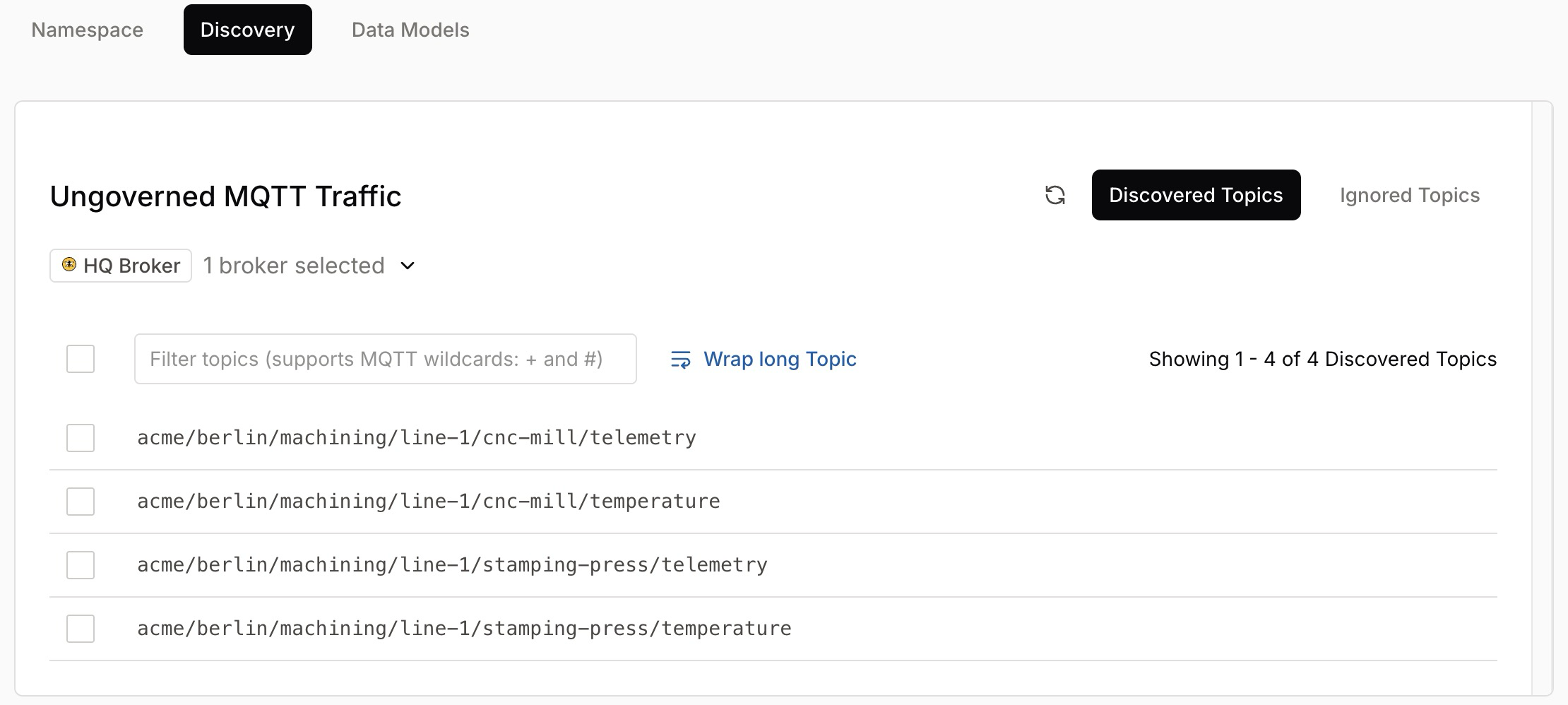
The Ungoverned MQTT Traffic panel organizes detected traffic into two sub-tabs:
-
Discovered Topics: Topics the platform has detected but that are not yet part of the namespace. These are candidates for approval.
-
Ignored Topics: Topics you have explicitly chosen to skip during namespace operations.
To narrow the list, use the topic filter input, which supports the MQTT wildcards + and #.
The Wrap long Topic toggle controls how the panel displays full topic strings. A count (for example, Showing 1 - 4 of 4 Discovered Topics) shows how many topics match.
Each topic has a checkbox so you can select one or more for review.
| Use the refresh control on the panel to pull the latest traffic from the selected broker. |
Review a Discovered Topic
Click a topic in the Discovered Topics list to open its detail view, titled Ungoverned Topic.
The detail view shows the topic (for example, acme/berlin/assembly/line-1/conveyor-belt/temperature) and provides everything you need to decide whether to bring it into the namespace.
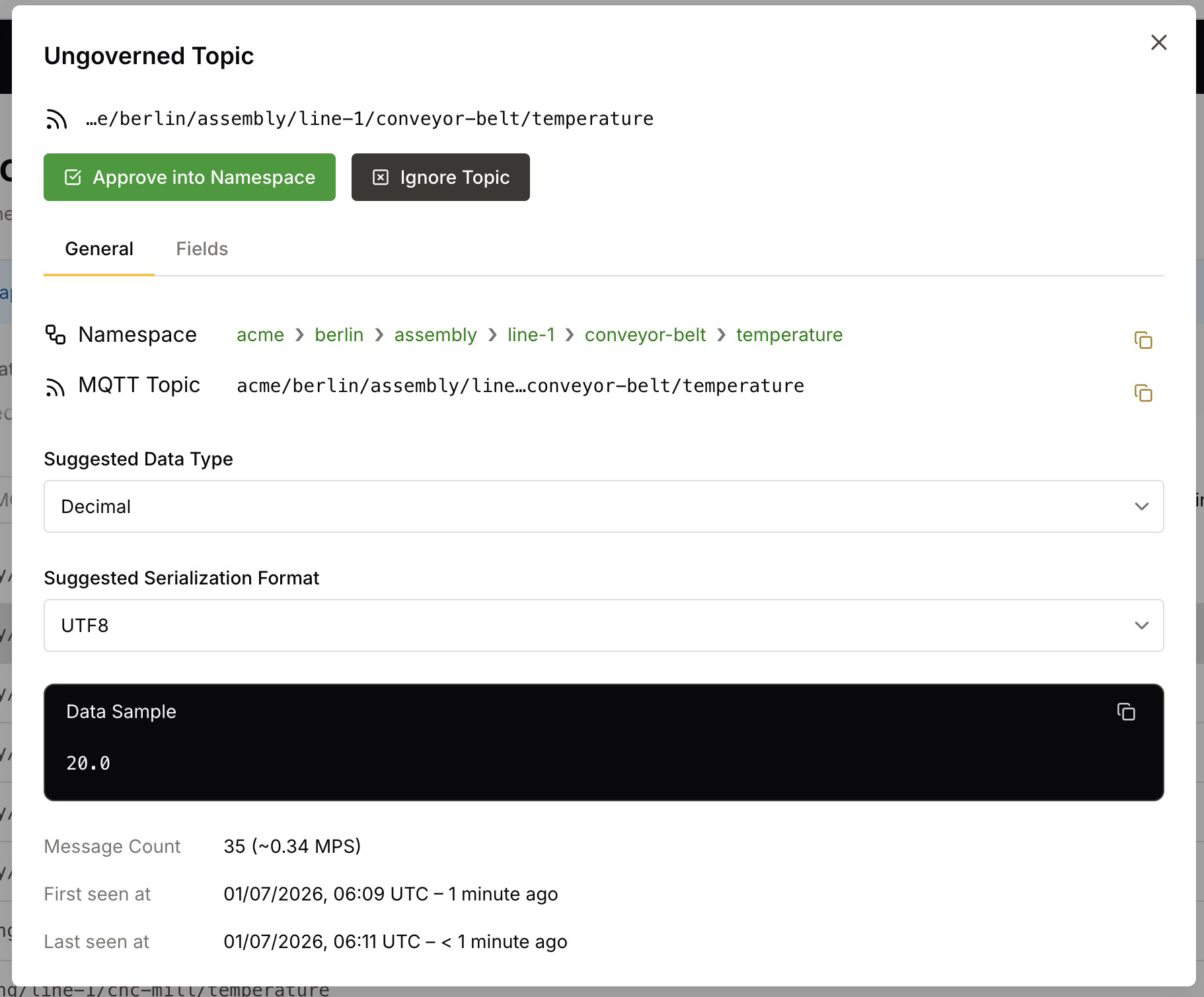
The General tab presents the following information:
| Field | Description |
|---|---|
Namespace |
The breadcrumb showing where the topic sits in the namespace hierarchy, such as |
MQTT Topic |
The full MQTT topic the data flows on. A copy button is provided. |
Suggested Data Type |
The data type the platform infers from the observed payloads, such as |
Suggested Serialization Format |
The serialization format the platform infers, such as |
Data Sample |
A sample payload observed on the topic, such as |
Message Count |
The number of messages observed on the topic, along with the approximate rate in messages per second (MPS), such as |
First seen at / Last seen at |
Timestamps for when the platform first and most recently observed the topic. |
When a discovered topic carries a complex payload, such as a JSON object, a Fields tab appears alongside General. The Fields tab lists the individual elements in the payload that are stored in the namespace as fields, together with their auto-selected types.
| You cannot edit field types during approval, but you can modify them individually after you add the topic to the namespace. |
Approve a Topic into the Namespace
When you approve a discovered topic, the platform creates a governed node in your namespace with the suggested metadata: the data type, serialization format, and the topic’s position in the hierarchy.
-
If your knowledge of the data source differs from the platform’s inference, adjust the Suggested Data Type and Suggested Serialization Format before approval.
-
Click Approve into Namespace to create the node.
-
If the topic requires parent nodes that do not yet exist, the platform adds them to the namespace automatically. The platform highlights any new parent nodes, so you can see what it created.
| All settings remain editable after approval. You can refine the node at any time once it is part of the namespace. |
| An approved node enters the namespace inactive. When you activate it, HiveMQ stores its history, runs its computations, and counts it toward your Data Intelligence bill. For details, see Node Activation. |
Approve or Ignore Topics in Bulk
When a broker exposes many topics, you can act on them together instead of reviewing each one. In the Discovered Topics list, use the checkboxes to select individual topics, or the header checkbox to select every topic the list currently holds.
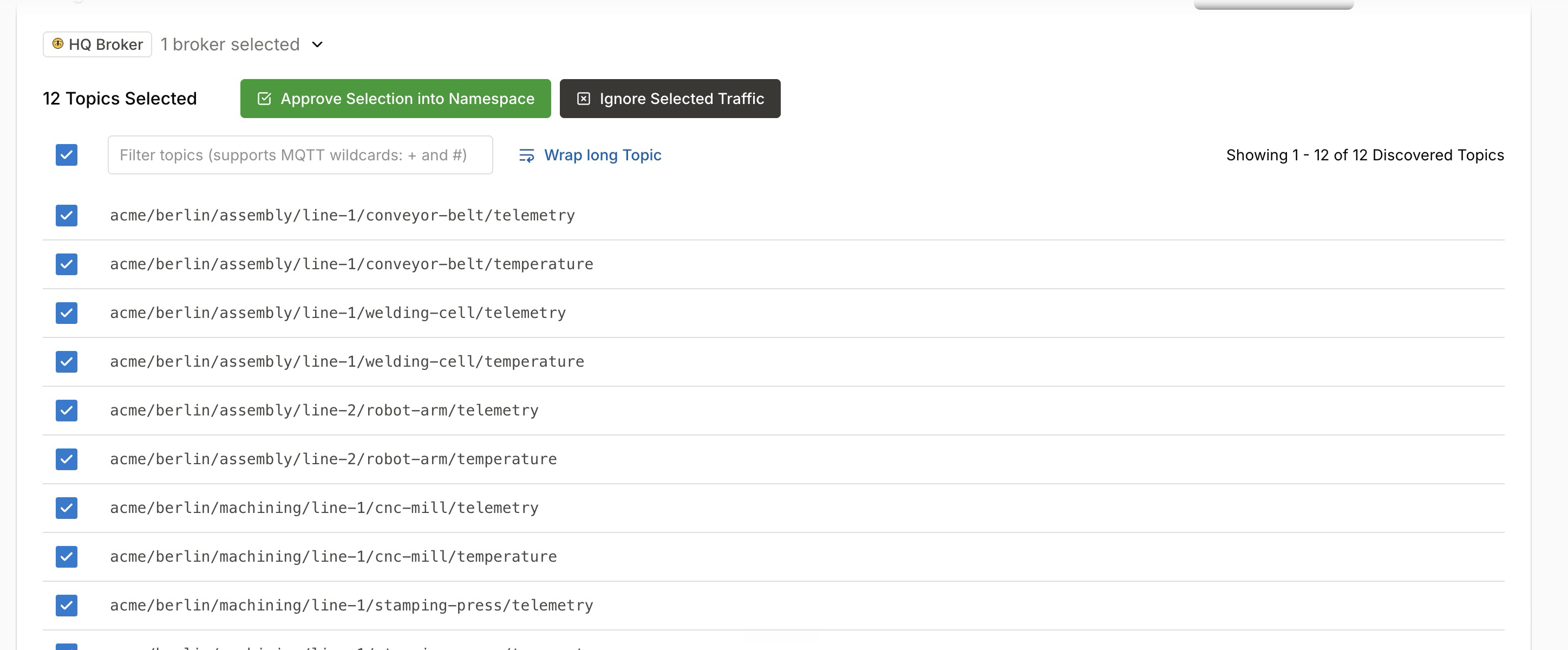
When you select one or more topics, the toolbar shows the number of selected topics (for example, 12 Topics Selected) along with two actions:
-
Approve Selection into Namespace: Adds every selected topic to the namespace in one step. The platform automatically creates the governed nodes with their inferred data types, serialization formats, and topic structure, so you do not have to review each topic individually.
-
Ignore Selected Traffic: Moves every selected topic to the Ignored Topics sub-tab in one step.
Discovery loads at most 1000 topics at a time. When a broker holds more, approve or ignore the loaded topics to reach the next batch.
| Bulk approval is the fastest way to populate a namespace from a broker that already carries structured traffic. You can refine any individual node afterward. |
Ignore a Topic
If a discovered topic does not belong in the namespace, click Ignore Topic. The topic moves to the Ignored Topics sub-tab, and namespace operations skip it.
To ignore several topics at once, use Ignore Selected Traffic, as described in Approve or Ignore Topics in Bulk.
Review and Restore Ignored Topics
Open the Ignored Topics sub-tab to see every topic you ignored on the selected brokers. The list shows each topic with the data type the platform inferred for it, and an Unignore button.
Click Unignore to bring a topic back into review. The platform can discover the topic again, so it returns to Discovered Topics when the broker next reports it.
| Unignore acts on one topic at a time. The Ignored Topics list offers no bulk selection. |
Next Steps
After you bring discovered data into your namespace, you can refine and extend the structure:
-
Refine and extend the structure top-down with Define Namespace.
-
Describe the structure of your payloads with Data Models.