HiveMQ Control Center: Data Hub View
HiveMQ Data Hub gives you the ability to ensure that the data you accept from your data sources has the quality you expect. Data Hub also makes it possible to model how your MQTT clients work with your broker.
From the Data Hub views, you can monitor policy activity, review your schemas, data policies, behavior policies, and scripts. You can also browse available modules, and create, configure, and manage module instances.
For detailed information on Data Hub features and configuration options, see HiveMQ Data Hub.
Overview
The Data Hub overview dashboard provides a clear view of the current quality of your data pipelines. The dashboard displays key metrics on policy activity to help you quickly identify issues.
| Metric | Description |
|---|---|
Successful Data Policies |
The number of data policy validations that succeeded in the selected time window. |
Failed Data Policies |
The number of data policy validations that failed in the selected time window. |
Below the chart, the overview ranks the top 10 policies by the metric you select: successful validations or failed validations.
| Column | Description |
|---|---|
Policy ID |
The unique identifier of the data policy. |
Count |
The number of successful or failed validations for the policy, based on the selected metric. |
Ratio |
The percentage that the policy contributes to the total for the selected metric. |
Distribution |
A bar that represents the ratio value. |
To review the full per-policy and per-client metrics, select View details. For more information, see Data Validation Metrics.
Data Validation Metrics
The Data Validation Metrics view provides per-policy and per-client data validation metrics. The view has two tabs: Policies and Clients.
Policies
The Policies tab lists the validation results for each data policy across all clients and cluster nodes.
| Column | Description |
|---|---|
Policy ID |
The unique identifier of the data policy. |
Successful Count |
The total number of successful validations for the policy. |
Failed Count |
The total number of failed validations for the policy. |
First Validated At |
The timestamp of the first validation recorded for the policy. |
Last Validated At |
The timestamp of the most recent validation recorded for the policy. |
Clients
The Clients shows which clients failed which policies. Each row represents one client with one policy that the client failed.
Each node keeps up to 1,000 client-policy failure entries and retains each entry for 24 hours after the client’s most recent failure. The Clients tab aggregates the entries from every node in the cluster.
| Column | Description |
|---|---|
Client ID |
The identifier of the client that failed the policy. |
Policy ID |
The unique identifier of the data policy that the client failed. |
Failed count |
The number of times the client failed the policy. |
First failed at |
The timestamp of the first failure recorded for the client and policy. |
Last failed at |
The timestamp of the most recent failure recorded for the client and policy. |
Schemas
Schemas are an essential part of data policies. Your Data Hub schemas define the rules and constraints that MQTT payload data must adhere to. These constraints help to ensure data quality and to maintain the integrity of your HiveMQ deployment. Data Hub currently supports JSON Schema and Protobuf.
The Schemas view provides basic information for each schema on your HiveMQ cluster and lets you create new schemas.
| Since Data Hub supports schema versioning, each schema can have multiple versions. To enhance readability, the Schemas view displays only the latest version of each schema. |
For more information on the use of schemas in HiveMQ Data Hub, see Schemas.
| Column | Description |
|---|---|
Schema ID |
The unique identifier of the schema. |
Type |
The schema type. For example, |
Version |
The latest version number of the schema. |
Last Updated |
The timestamp when the schema was last updated. |
Select a schema to open the detail view, where you can see the schema definition per version, add a version, or delete all versions of the schema.
Data Policies
Data Hub data policies ensure that the payload data in MQTT messages has the structure and format you expect. Data policies use schema-based data validation to verify that MQTT data meets your requirements.
The Data Policies view provides basic information for each data policy on your HiveMQ cluster and lets you create new data policies.
For more information on the use of data policies in HiveMQ Data Hub, see Data Policies.
| Column | Description |
|---|---|
Policy ID |
The unique identifier of the data policy. |
Topic Filter |
The MQTT topic filter to which the data policy applies. |
Created At |
The timestamp when the data policy was initially created. |
Last Updated |
The timestamp when the data policy was last updated. |
Select a data policy to open the detail view, where you can review, edit, or delete the policy.
Behavior Policies
Data Hub behavior policies give you the ability to model the expected behavior of your MQTT clients throughout the entire client lifecycle. Client behavior is checked against your defined behavior model to determine whether the client is acting in the expected manner. The behavior model builds a level of control on top of the MQTT protocol with a state machine that checks how the client interacts with the HiveMQ broker.
The Behavior Policies view provides basic information for each behavior policy on your HiveMQ cluster and lets you create new behavior policies.
For more information on the use of behavior policies in HiveMQ Data Hub, see Behavior Policies.
| Column | Description |
|---|---|
Policy ID |
The unique identifier of the behavior policy. |
Client ID Regex |
The regular expression that matches the client IDs to which the behavior policy applies. For more information, see Behavior Policy Matching. |
Created At |
The timestamp when the behavior policy was initially created. |
Last Updated |
The timestamp when the behavior policy was last updated. |
Select a behavior policy to open the detail view, where you can review, edit, or delete the policy.
Scripts
Data transformation scripting gives you the ability to add custom JavaScript-based transformation functions to Data Hub data policies. Scripts can help you bring diverse data from IoT devices into a common format that your applications can understand and process.
The Scripts view provides basic information for each script on your HiveMQ cluster and lets you create new scripts.
For more information on the use of scripts in HiveMQ Data Hub, see Transformations.
| Column | Description |
|---|---|
Script ID |
The unique identifier of the script. |
Description |
A brief summary of the purpose of the script. |
Version |
The latest version number of the script. |
Last Updated |
The timestamp when the script was last updated. |
Select a script to open the detail view, where you can see the script source per version, add a version, or delete the script.
Modules
HiveMQ Modules for Data Hub offer easy-to-use functionality that can be quickly accessed from the HiveMQ Control Center. Modules can be used to define fine-grained and fully flexible Data Hub policies or to utilize pre-defined modules that implement pre-defined functionality.
| The HiveMQ Modules for Data Hub feature utilizes transformation scripts that are not yet fully supported for Linux Arm64. As a result, you cannot use the Data Hub Modules feature on Linux Arm64. |
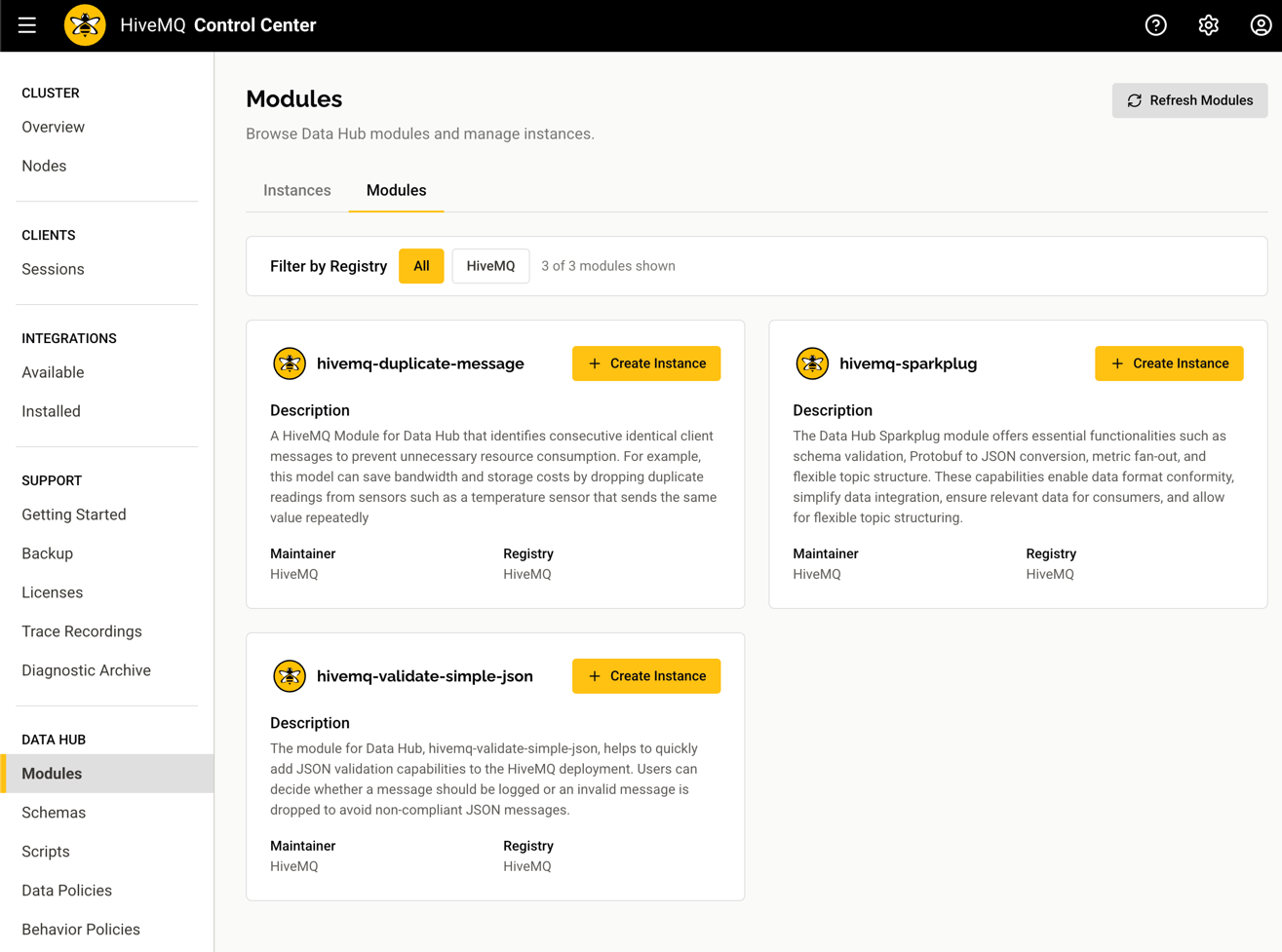
The Modules page provides two tabs: Modules to browse available modules across your configured registries, and Instances to view all running module instances.
For more information on the use of modules in HiveMQ Data Hub, see HiveMQ Modules for Data Hub.
Modules Tab
The Modules tab displays all available modules from your configured registries.
From this tab, you can select a module and create a new instance from it.
| If a registry fails to load, a warning is displayed with the name of the affected registry. |
| Entry | Description |
|---|---|
Module Name |
The name of the module. |
Description |
A brief summary of the capabilities and purpose of the module. |
Maintainer |
The entity responsible for the management of the module. |
Registry |
The name of the registry that provides the module. |
Instances Tab
The Instances tab lists all module instances on your HiveMQ cluster. Each module instance represents a configured deployment of a specific module version.
From this tab, you can edit, enable, disable, and delete module instances.
| Column | Description |
|---|---|
Module |
The name of the module from which the instance was created. |
ID |
The unique identifier of the module instance. |
Version |
The version of the module from which the instance was created. |
Enabled |
Indicates whether the module instance is currently enabled or disabled. |
Created At |
The timestamp when the module instance was initially created. |
Last Updated |
The timestamp when the module instance was last updated. |
Select a module instance to open the detail view, where you can review and update its configuration.